Codelab I Exercises
Ciphers
In these exercises, you’ll implement and then break a selection of cryptographic ciphers. You’ll need to use arrays, loops and conditionals – if this is completely new, then consider doing those exercises first, so you feel comfortable working with them.
Caesar’s Cipher
The Caesar Cipher (or shift cipher) encrypts a message by “adding” a fixed number, the encryption key, to each character in the message.
For example, if the encryption key is 5, A would become F (via B,C,D,E,F), G would become L, and Q would become V. If the end of the alphabet is reached, then wrap back around to the beginning – e.g., X would become C (Y,Z,A,B,C)
In C++, characters are simply integers in disguise, encoded by their ASCII value. In addition, C++ lets you treat strings as arrays of characters (you can access and modify characters in a string using their index).
-
Implement the Caesar Cipher:
- Allow the user to enter a string, the plaintext message.
- Then allow the user to enter a number (between 1 and 26), the encryption key.
-
Encrypt the message by shifting each character by the encryption key (i.e., adding the encyption key to each letter in the message, taking care to handle shifts which need to be wrapped around to the beginning of the alphabet).
When encrypting, decide what to do with spaces – you could remove them, include them in the shift, or leave them unchanged.
- Print out the encrypted message.
-
Now implement decryption:
Decryition is the inverse of encryption: for each letter in the entered ciphertext, subtract the encryption key to recover the corresponding letter in the plaintext. Test your two progrlams by ensuring that encrypting and then decrypting a message using the same key results in the original message.
-
Crack the cipher.
- The Caesar cipher has only 25 possible keys. This means brute force is a viable option.
- For each possible key, from 1 to 25, attempt to decrypt the ciphertext. Print the result out to the terminal.
- You should be able to (manually) determine the key by looking through the decrypted messages.
Substitution Cipher
A substitution cipher encrypts a message by replacing each letter with a another. The encryption key defines the substitutions. E.g., a possible key is
a b c d e f g h i j k l m n o p q r s t u v w x y z
B J X Z C E A G H M O N Q F I Y P U T S V W D J L K
With this key, hello would be encrypted as GCNNI
- Implement encryption:
- Define the encryption key (use an array).
- Define the plaintext (a string).
- For each letter in the plaintext, look up the corresponding letter in the key in order to encrypt it.
- Print out the ciphertext.
This time, it may be easier to start with a hard-coded key; you can allow the user to input it later.
-
Implement decryption as the reverse process of encryption.
-
Break the cipher.
Unlike with the Caesar cipher, the substitution cipher has many possible keys (26 factorial) – too many to brute force. A more sophisticated technique is needed.
The distribution of letters in a certain language is known (e.g., in English,
Eis the most common letter). This knowledge can be used to crack the cipher.- Identify the most common letter in the ciphertext, second-most-common, and so on (i.e., make a frequency chart for letters in your ciphertext).
- Then use letter frequencies in English (assuming you know the plaintext was in English) to try to guess the key.
- This may be a semi-manual process. I.e., you may be able to guess the substitution for
EandT, the most, and second-most, common letter in English, automatically. Do this and print out the partially guessed message. - From here, your program may not be able to directly decrypt the message, but it can help. E.g., get it to show you the frequencies of letters in the message and allow you to substitute one letter at a time.
Columnar Transposition Cipher
So far, we have seen two substitution ciphers (Caesar is just a special case of substitution). Now we will see a transposition cipher – a cipher which re-arranges the letters in a certain way.
The columnar transposition cipher works by creating a grid with a fixed with and writing the message in the grid, filling cells from left to right, top to bottom. The ciphertext is then read off by column, i.e., from top to bottom, then left to right. The key is the number of columns in the grid.
For example, with 3 columns, the message ‘attackatdawn` is written as
1 2 3
a t t
a c k
a t d
a w n
Reading off by colunm, the ciphertext is AAAATCTWTKDN.
In order to recover the plaintext, the recipient has to construct a grid with the number of columns indicated by the key, write the message from top to bottom, left to right, and then read it off from left to right, top to bottom (reversing the process of encryption).
-
Implement encryption.
-
Allow the user to enter the message to be encrypted and the key (a number).
You may want to impose some restrictions on the key. E.g. what happens if a key of 1 is given? Or what happens if a key larger than the length of the message is given?
-
Encrypt the message.
There are many ways to do this, but you may want to use a 2-dimensional array to represent the grid. I.e.,
char cipherGrid[rows][key]. You’ll have to calculate the value of the variablerows. Also, take care, when reading the cipher text, to look out for empty squares at the end of the message.
-
The Virginere Cipher
Enigma
The Enigma machine has a keyboard for entering the text to be encrypted, a “reflector”, and three “rotors”. The rotor settings define the encryption key.
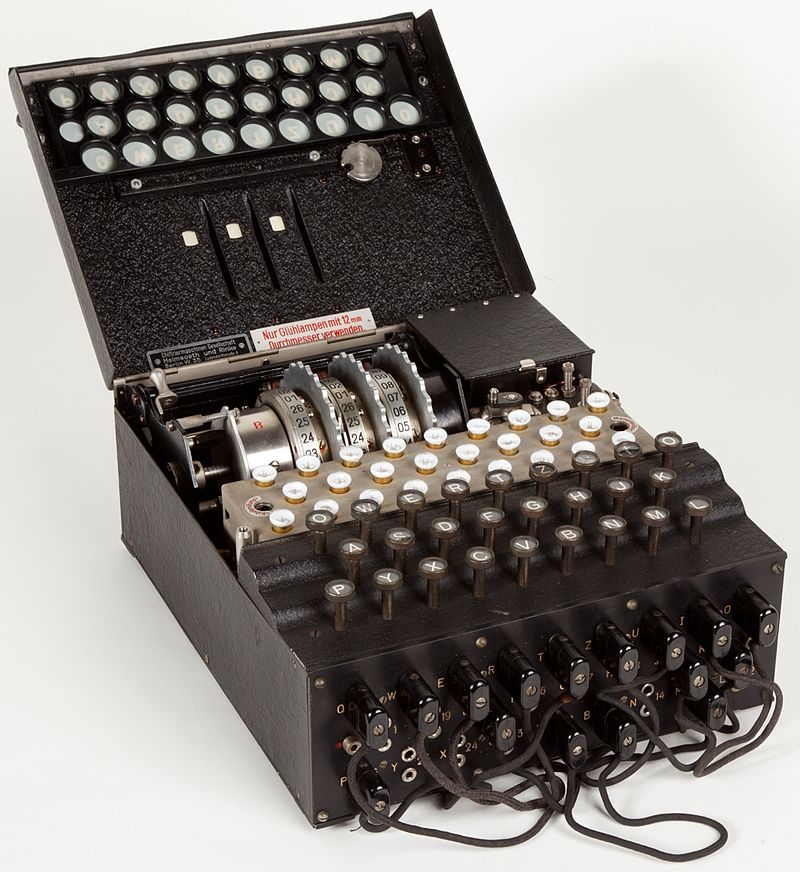
-
When a key is pressed, a letter is entered.
This letter will be represented by
X. - The key press makes the first rotor, Rotor 3 “advances” by one, i.e., it’s setting increases by one.
- Each of the three rotors performs a substitution:
- First
Rot3(X) ==> X', - then
Rot2(X') ==> X'', - and finally
Rot1(X'') ==> Y
- First
- Next, the reflector performs a substitution on
Y.Refl(Y) ==> Y'
- To completee the encryption, the output of the reflector,
Y', is passed through the reflectors in reverse order.Inv(Rot1(Y')) ==> ZInv(Rot2(Z)) ==> Z'Inv(Rot3(Z')) ==> Z''
- Theree is a notch on rotor 2 which is caught by Rotor 3, causing Rotor 2’s setting to increase by 1.
- Similarly, there is a notch on Rotor 2, which moves Rotor 1 to the next setting.
A detailed description can be found at https://www.codesandciphers.org.uk.
Implement the Enigma Machine.
To get you started, here are the substitutions performed by each rotor, the notch positions which cause Rotors 2 and 1 to increment, and the substitution performed by the Reflector.
// rotor and reflector configurations
const char ROT_III[]   = "BDFHJLCPRTXVZNYEIWGAKMUSQO";
const char ROT_II[]    = "AJDKSIRUXBLHWTMCQGZNPYFVOE";
const char ROT_I[]     = "EKMFLGDQVZNTOWYHXUSPAIBRCJ";
const char REFLECTOR[] = "YRUHQSLDPXNGOKMIEBFZCWVJAT";
const int NOTCH_II = 7;
const int NOTCH_I = 19;